
Python代码混淆、加密方法
1. 安装:
pip install pyminifier
或
pip install pyminifier -i https://pypi.tuna.tsinghua.edu.cn/simple/ --trusted-host pypi.tuna.tsinghua.edu.cn
如果报错,则通过以下方法解决
pip install pywin32
pip install wheel
pip install pyminifier
2. 代码加密
pyminifier --nonlatin --replacement-length=10 -O xxx.py  注:(10和大写ou)
或
pyminifier --obfuscate your_script.py > obfuscated_script.py
该方法比较普通,加密效果弱
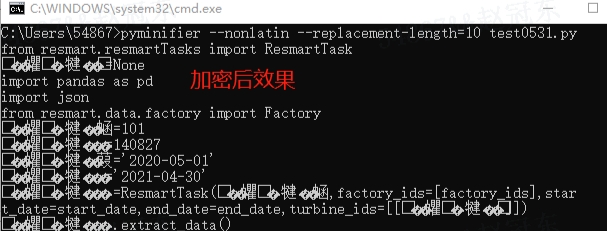
3. 另一种方法, 利用Base64对代码进行再次编码,再利用lzma算法进行压缩,但是这种加密方式仅仅用于代码没有调用隐式导入的情况。 (UnicodeDecodeError解决链接)
pyminifier --lzma "xxx.py"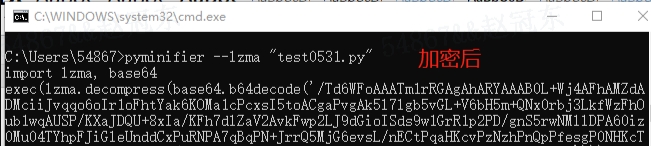
4. 两种方法混合使用,效果最佳
5. 语法介绍
replacement-length 代码的变量的一个混淆长度, int
-O :混淆所有函数/方法名、变量和类。默认是不要混淆。6. 操作示例:
# 将脚本 demo02.py 按 lzma 加密,并生成新的脚本 demo02_2.py
C:\Users\54867>pyminifier --lzma "demo02.py">demo02_2.py
# 将脚本 demo02.py 加密,并生成新的脚本 new_demo02.py
C:\Users\54867>pyminifier -O --replacement-length=10 ./demo02.py>new_demo02.py
#在 cmd 中执行这个脚本,查看是否正常运行
C:\Users\54867>python new_demo02.py
# 加密后生成新脚本,并自定义路径(已有路径)
C:\Users\54867>pyminifier -O --replacement-length=10 ./demo02.py>D:\输出\new_demo02.py
7. pyminifier 详细命令方法如下:
pyminifier -h
Usage: pyminifier [options] "<input file>"

Options:
  --version             show program's version number and exit
  -h, --help            show this help message and exit
  -o <file path>, --outfile=<file path>
                        Save output to the given file.

  -d <file path>, --destdir=<file path>
                        Save output to the given directory. This option is
                        required when handling multiple files. Defaults to
                        './minified' and will be created if not present.
                        将输出保存到给定的目录。当处理多个文件时,此选项是必需的。默认为'./minified',如果不存在,将被创建。

  --nominify            Don't bother minifying (only used with --pyz).

  --use-tabs            Use tabs for indentation instead of spaces.
  						使用制表符代替空格来缩进。

  --bzip2               bzip2-compress the result into a self-executing python
                        script.  Only works on stand-alone scripts without
                        implicit imports.
                        以bzip2方式压缩将结果到一个自动执行的python脚本中。只能在独立脚本上工作,不需要隐式导入。

  --gzip                gzip-compress the result into a self-executing python
                        script.  Only works on stand-alone scripts without
                        implicit imports.
                        以gzip方式压缩结果到一个自执行的python脚本中。只能在独立脚本上工作,不需要隐式导入。

  --lzma                lzma-compress the result into a self-executing python
                        script.  Only works on stand-alone scripts without
                        implicit imports.
						以lzma方式压缩将结果到一个自动执行的python脚本中。只能在独立脚本上工作,不需要隐式导入。

  --pyz=<name of archive>.pyz
                        zip-compress the result into a self-executing python
                        script. This will create a new file that includes any
                        necessary implicit (local to the script) modules.
                        Will include/process all files given as arguments to
                        pyminifier.py on the command line.
  -O, --obfuscate       Obfuscate all function/method names, variables, and
                        classes.  Default is to NOT obfuscate.
  --obfuscate-classes   Obfuscate class names.
  --obfuscate-functions
                        Obfuscate function and method names.
  --obfuscate-variables
                        Obfuscate variable names.
  --obfuscate-import-methods
                        Obfuscate globally-imported mouled methods (e.g.
                        'Ag=re.compile').
  --obfuscate-builtins  Obfuscate built-ins (i.e. True, False, object,
                        Exception, etc).
  --replacement-length=1
                        The length of the random names that will be used when
                        obfuscating identifiers.
  --nonlatin            Use non-latin (unicode) characters in obfuscation
                        (Python 3 only).  WARNING: This results in some
                        SERIOUSLY hard-to-read code.
  --prepend=<file path>
                        Prepend the text in this file to the top of our
                        output.  e.g. A copyright notice.