【Python】hosts文件自动更新脚本
因为访问github很麻烦,每次都需要更新dns,于是写了这个脚本,因为是更改C盘hosts文件,所以执行会自动申请管理员权限:
import ctypes
import sys


def is_admin():
    try:
        return ctypes.windll.shell32.IsUserAnAdmin()
    except:
        return False


if is_admin():

    import requests
    from time import sleep
    import os
    import datetime

    url = 'https://cdn.jsdelivr.net/gh/521xueweihan/GitHub520@main/hosts'  # 目标下载链接
    r = requests.get(url)  # 发送请求

    now = datetime.datetime.now().strftime('%Y-%m-%d %H:%M:%S')

    content = f"""
# Copyright (c) 1993-2009 Microsoft Corp.
# This is a sample HOSTS file used by Microsoft TCP/IP for Windows.

# This file contains the mappings of IP addresses to host names. Each
# entry should be kept on an individual line. The IP address should
# be placed in the first column followed by the corresponding host name.
# The IP address and the host name should be separated by at least one
# space.

# Additionally, comments (such as these) may be inserted on individual
# lines or following the machine name denoted by a '#' symbol.

# For example:
#
# localhost name resolution is handled within DNS itself.
# 127.0.0.1 localhost
# ::1 localhost
127.0.0.1 www.xmind.net
# 以上为你默认配置的hosts文件,删除github相关,复制进来。
\n
#{now}
    \n
    {r.text}
    """
    with open('C:\\Windows\\System32\\drivers\\etc\\hosts', 'w+') as f:
        f.write(content)
        f.close

    dnsFlush = "ipconfig /flushdns"
    os.system(dnsFlush)
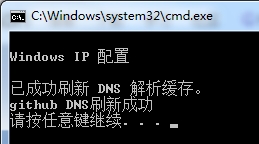
    print("github DNS刷新成功")
    sleep(3)
else:
    # Re-run the program with admin rights
    ctypes.windll.shell32.ShellExecuteW(
        None, "runas", sys.executable, __file__, None, 1)